> For the complete documentation index, see [llms.txt](https://docs.overleaf.com/llms.txt). Markdown versions of documentation pages are available by appending `.md` to page URLs; this page is available as [Markdown](https://docs.overleaf.com/navigating-in-the-editor/generated-files.md).
# Generated files
Most of the time, generated files are only used by the LaTeX compiler and other tools, but in some cases they need to be accessed directly.
To view the list of files which are generated upon compilation of the project, such as `.aux`, `.log` and `.toc` files, you can click into **Logs and output files**:
and scroll down to **Other logs and files**.
This will provide you with the option of downloading selected files or all the files generated by the compiler.
## Downloading generated files along with the source
When you download the source files for your project using the standard options, the generated files are not included.
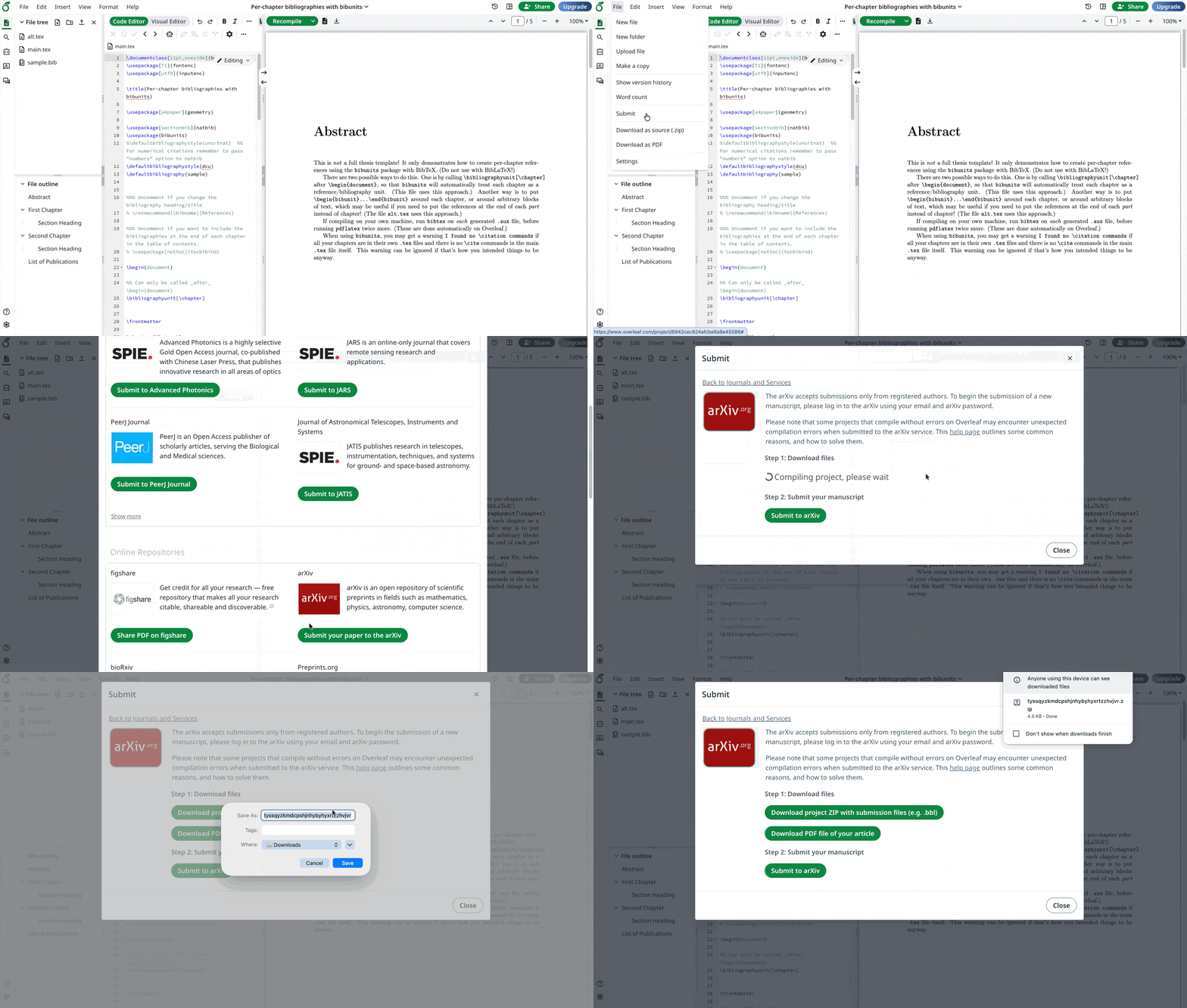
Some journals and repositories ask for the generated files to be included along with the source. Overleaf's **Submit to arXiv** option will produce a zip that includes both the source and the generated files. This option does not directly submit to arXiv, but rather produces a zip file in the format expected by arXiv, which can also be used for other journals and services that expect the same format.
### How to submit to a journal or service
1. Go to **File** > **Submit**, then choose a journal or service. There will be an option to download a `.zip` with the `.bbl` included.
2. Once you select the **Download project ZIP with submission files** button, it should show a "Compiling project, please wait" message. It may take a while to build, then download, the zip file.
3. Select the **Submit to \[journal or service]** button to be directed to the corresponding external website to upload your project ZIP.
## Including .bbl contents directly in the .tex file
Some publishers use article-submission systems that cannot process a separate .bib file. In such cases, the publisher’s guidelines might ask authors to paste the contents of the `.bbl` file (generated by BibTeX) into the article’s main `.tex` file.\
\
If BibTeX is used, the .bbl file produced by the Overleaf compile process can be downloaded (as described above), and its contents can be added to the .tex file to accommodate these submission systems.
### How to download a `.bbl` file
1. Select the **Logs and output files** button to the right of the Recompile button.
2. Scroll down and select the **Other logs and files** button in the bottom right.
3. In the menu that appears, select the `output.bbl` file to download it.
### How to paste a `.bib` file's contents into the project’s main `.tex` file
1. After you've [downloaded the `.bbl` file](#how-to-download-a-.bbl-file), copy the contents of the file.
2. Comment out the `\bibliography{}` line of your `.tex` file.
3. Paste the contents of the downloaded `.bbl` file.
4. [Recompile](/getting-started/recompiling-your-project.md).
---
# Agent Instructions
This documentation is published with GitBook. GitBook is the documentation platform designed so that both humans and AI agents can read, navigate, and reason over technical content effectively. Learn more at gitbook.com.
## Querying This Documentation
If you need additional information that is not directly available in this page, you can query the documentation by asking a question.
Perform an HTTP GET request on the following URL with the `ask` and `goal` query parameters:
```
GET https://docs.overleaf.com/navigating-in-the-editor/generated-files.md?ask=&goal=
```
`ask` is the immediate question: it should be specific, self-contained, and written in natural language.
`goal` is what the user is ultimately trying to achieve, the reason they need the answer. Sharing it helps GitBook give you a better, more relevant answer. A goal is most helpful when it describes the outcome the user wants rather than restating the question. For example, with `ask=how do I create an API token`, a goal like `automate deployments from our CI pipeline` lets GitBook tailor the answer to that use case.
The response will contain a direct answer to the question and relevant excerpts and sources from the documentation.
Use this mechanism when the answer is not explicitly present in the current page, you need clarification or additional context, or you want to retrieve related documentation sections.